# Getting Started: Setting Up a Local Dev Environment - and related bug fixes
**URL:** https://publichappinessmovement.com/t/topic/1216
**Category:** Front End - Documentation
**Tags:** documentation, npm, local-dev-environmen, webdev, getting-started
**Created:** [25 April 2019 16:34 UTC](https://publichappinessmovement.com/t/topic/1216 "2019-04-25T16:34:56Z")
**Posts on this page:** 20
**Page:** 2
### Author:  [@cw00dw0rd](https://publichappinessmovement.com/u/cw00dw0rd)
#### Post date: [25 March 2022 14:12 UTC](https://publichappinessmovement.com/t/topic/1216/21 "2022-03-25T14:12:38Z")
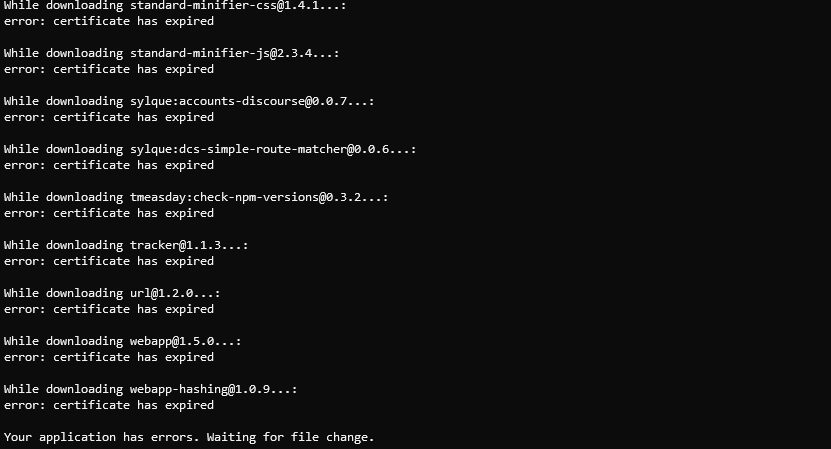
Has anyone experienced the “Certificate expired” error when attempting to start for the first time?
Found similar reports here: [[Solved] Error: Certificate has expired - help - Meteor Forum](https://forums.meteor.com/t/solved-error-certificate-has-expired/49912)
Added settings.json file to project root as noted here: [https://docs.meteor.com/expired-certificate.html](https://docs.meteor.com/expired-certificate.html)
But this did not resolve.
Seems like there might be some potential security implications from this though, so was curious if anyone else has run into this?
[@WebDev](https://publichappinessmovement.com/groups/webdev) [@ReactMeteor](https://publichappinessmovement.com/groups/reactmeteor)
---
### Author:  [@AndyatFocallocal](https://publichappinessmovement.com/u/AndyatFocallocal)
#### Post date: [25 March 2022 14:39 UTC](https://publichappinessmovement.com/t/topic/1216/22 "2022-03-25T14:39:37Z")
Is that regarding our SSL certificate? I’ll ask Tom on Slack
---
### Author:  [@AndyatFocallocal](https://publichappinessmovement.com/u/AndyatFocallocal)
#### Post date: [25 March 2022 14:42 UTC](https://publichappinessmovement.com/t/topic/1216/23 "2022-03-25T14:42:49Z")
We do use Lets Encrypt and our Meteor packages are old, so that looks like the issue.
Did you try the workarounds in the article you linked? Or do they need to be added in a PR to our main repo?
---
### Author:  [@tmcnulty](https://publichappinessmovement.com/u/tmcnulty)
#### Post date: [28 March 2022 15:58 UTC](https://publichappinessmovement.com/t/topic/1216/24 "2022-03-28T15:58:57Z")
I’ve had a lot of this same issue with my own environment as well as with some systems at work. I’m working on fixing my stuff. If I get it working I’ll update.
---
### Author:  [@AndyatFocallocal](https://publichappinessmovement.com/u/AndyatFocallocal)
#### Post date: [30 March 2022 22:41 UTC](https://publichappinessmovement.com/t/topic/1216/25 "2022-03-30T22:41:21Z")
Did you manage to resolve this @cw00dw0rd?
---
### Author:  [@cw00dw0rd](https://publichappinessmovement.com/u/cw00dw0rd)
#### Post date: [7 April 2022 03:08 UTC](https://publichappinessmovement.com/t/topic/1216/26 "2022-04-07T03:08:45Z")
I wasn’t able to but I will have to revisit this weekend
---
### Author:  [@cw00dw0rd](https://publichappinessmovement.com/u/cw00dw0rd)
#### Post date: [15 May 2022 19:25 UTC](https://publichappinessmovement.com/t/topic/1216/27 "2022-05-15T19:25:56Z")
@tmcnulty @AndyatFocallocal I am still receiving the same error today after pulling the recent changes from master. I attempted to implement some of the workarounds but none have resolved it for me.
It seems that updating meteor is the best way forward but that also seems like a big undertaking.
Any suggestions?
---
### Author:  [@AndyatFocallocal](https://publichappinessmovement.com/u/AndyatFocallocal)
#### Post date: [17 May 2022 22:01 UTC](https://publichappinessmovement.com/t/topic/1216/28 "2022-05-17T22:01:05Z")
Not that I can think of. It would be an excellent step forwards.
---
### Author:  [@AndyatFocallocal](https://publichappinessmovement.com/u/AndyatFocallocal)
#### Post date: [26 May 2022 16:03 UTC](https://publichappinessmovement.com/t/topic/1216/29 "2022-05-26T16:03:38Z")
@cw00dw0rd We had an onboarding meeting a few days ago and @Marvelxy was able to guide @scottly426 through setting up. Hopefully they overcame this issue on the way.
Also tagging @lowesilvan as i believe he’s still stuck on getting a stable localhost running. Is this the same issue you’re working through Lowe?
---
### Author:  [@lowesilvan](https://publichappinessmovement.com/u/lowesilvan)
#### Post date: [26 May 2022 16:52 UTC](https://publichappinessmovement.com/t/topic/1216/30 "2022-05-26T16:52:23Z")
Yes @AndyatFocallocal I and @Marvelxy are still trying to get the localhost running on my end
---
### Author:  [@scottly426](https://publichappinessmovement.com/u/scottly426)
#### Post date: [27 May 2022 17:01 UTC](https://publichappinessmovement.com/t/topic/1216/31 "2022-05-27T17:01:23Z")
I tried everything and these two steps seem to work for me. I will be writing a more comprehensive guide but just leaving this here for now in case anyone needs it.
1. Delete package-lock.json and node\_modules folder.
2. In package.json ; change “@babel/runtime”: **“^7.0.0-beta.42”** to “@babel/runtime”: **“7.0.0-beta.47”** , (without the carrot in front!) (also make sure to press save!)
3. Run meteor npm install
4. This is a weird one; for Window users, using Powershell will NOT set NODE\_TLS\_REJECT\_UNAUTHORIZED=0. The only way I found was to switch to Command Prompt and running set NODE\_TLS\_REJECT\_UNAUTHORIZED=0; Command Prompt will also NOT run meteor in my case, so switch back to PowerShell and in the terminal type in npm run start.
These two steps worked for me. But I had to set up new environment variables on my desktop to get it to work. If you are still having trouble message me!
---
### Author:  [@cw00dw0rd](https://publichappinessmovement.com/u/cw00dw0rd)
#### Post date: [7 June 2022 19:41 UTC](https://publichappinessmovement.com/t/topic/1216/32 "2022-06-07T19:41:46Z")
Thank you for the update @scottly426 I will try this out this weekend!
---
### Author:  [@xarielah](https://publichappinessmovement.com/u/xarielah)
#### Post date: [8 December 2022 06:58 UTC](https://publichappinessmovement.com/t/topic/1216/34 "2022-12-08T06:58:53Z")
[@ReactMeteor](https://publichappinessmovement.com/groups/reactmeteor)
For future cases - you will need to set an Environment Variable on windows (No command worked for me so I did it manually via “Edit the system environment variables”.
You will need to set:
Variable name: NODE\_TLS\_REJECT\_UNAUTHORIZED
Variable value: 0
seems like I got over the Error: certificate has expired thing.
I will update further on.
================================================
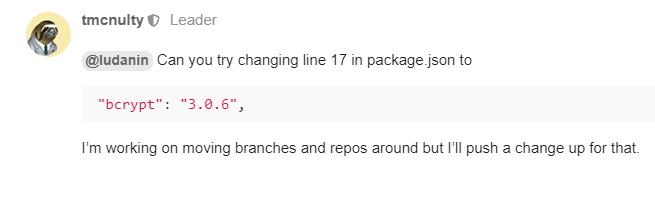
More issues on setting up the dev env, I fixed bcrypt error with:
And now i’m stumbling with:

---
### Author:  [@AndyatFocallocal](https://publichappinessmovement.com/u/AndyatFocallocal)
#### Post date: [8 December 2022 10:03 UTC](https://publichappinessmovement.com/t/topic/1216/36 "2022-12-08T10:03:52Z")
Well done with that fix and for sharing the code here so others who have the same issue can find it.
It’s great that you are going so hard in problem solving. Your biggest issue is likely to be trying to set up in windows. Others have succeeded before but with great difficulty and the result is pretty unstable, it worked for a few days and then for no obvious reason threw a new error code back.
I suggest running Linux for coding. I run Linux mint from USB on one machine and in an emulator inside windows on another. If you’d like a guide on setting either up let me know.
---
### Author:  [@AndyatFocallocal](https://publichappinessmovement.com/u/AndyatFocallocal)
#### Post date: [8 December 2022 10:08 UTC](https://publichappinessmovement.com/t/topic/1216/37 "2022-12-08T10:08:09Z")
For others searching in the future the error message keywords look to be:
Devtools failed to load browser polyfill
---
### Author:  [@xarielah](https://publichappinessmovement.com/u/xarielah)
#### Post date: [8 December 2022 14:01 UTC](https://publichappinessmovement.com/t/topic/1216/38 "2022-12-08T14:01:25Z")
I will surely try and work on a VM with Ubuntu, I’ll be installing that during this day and tomorrow and update on how is it going, thanks!
Any IDEs recommended for Linux? I take a guess that vscode isn’t going to work there
---
### Author:  [@AndyatFocallocal](https://publichappinessmovement.com/u/AndyatFocallocal)
#### Post date: [8 December 2022 14:57 UTC](https://publichappinessmovement.com/t/topic/1216/39 "2022-12-08T14:57:15Z")
I use Oracle VM and its been great. You can also set up copy/paste between the VM and windows so you can use vscode and copy paste your work over. I doubt that’s a optimum setup for anything complicated though. Best to ask @Marvelxy for the best IDE as he’s more experienced than me.
---
### Author:  [@Marvelxy](https://publichappinessmovement.com/u/Marvelxy)
#### Post date: [8 December 2022 15:39 UTC](https://publichappinessmovement.com/t/topic/1216/40 "2022-12-08T15:39:07Z")
Visual studio code works on Linux. I use ubuntu, there should be a version for other Linux distros.
---
### Author:  [@xarielah](https://publichappinessmovement.com/u/xarielah)
#### Post date: [9 December 2022 11:21 UTC](https://publichappinessmovement.com/t/topic/1216/41 "2022-12-09T11:21:59Z")
@Marvelxy
I sure need a guide if have you one for getting a Linux machine on Oracle VBox.
I installed Ubuntu on Oracle VirtualBox but having permissions issues anytime I try installing node “sudo apt-get install -y nodejs” or from Node official site (files)
---
### Author:  [@AndyatFocallocal](https://publichappinessmovement.com/u/AndyatFocallocal)
#### Post date: [9 December 2022 11:40 UTC](https://publichappinessmovement.com/t/topic/1216/42 "2022-12-09T11:40:24Z")
[I followed this one](https://itsfoss.com/install-linux-mint-in-virtualbox), although that is for Mint rather than Ubuntu
[Previous page](https://publichappinessmovement.com/t/topic/1216.md?page=1)
[Next page](https://publichappinessmovement.com/t/topic/1216.md?page=3)