# Setting up Discourse for Local Development (Local Host)
**URL:** https://publichappinessmovement.com/t/topic/2630
**Category:** Front End - Documentation
**Tags:** documentation, ruby-on-rails, localhost, discourse, webdev, js
**Created:** [13 August 2021 22:54 UTC](https://publichappinessmovement.com/t/topic/2630 "2021-08-13T22:54:53Z")
**Posts on this page:** 4
**Page:** 1
### Author:  [@Marvelxy](https://publichappinessmovement.com/u/Marvelxy)
#### Post date: [13 August 2021 22:54 UTC](https://publichappinessmovement.com/t/topic/2630/1 "2021-08-13T22:54:53Z")
Setting up Discourse for local development is not easy, especially if we don’t know Ruby on Rails (The framework that powers Discourse). I found this guide helpful. It contains every necessary step:
> **[Install Discourse on Ubuntu or Debian for Development](https://meta.discourse.org/t/install-discourse-on-ubuntu-or-debian-for-development/14727)**
>
> ⚠ This guide covers installation instructions in a development environment. For a production guide see: Install Discourse in production with the official supported instructions So you want to set up Discourse on Ubuntu or Debian to hack on and...
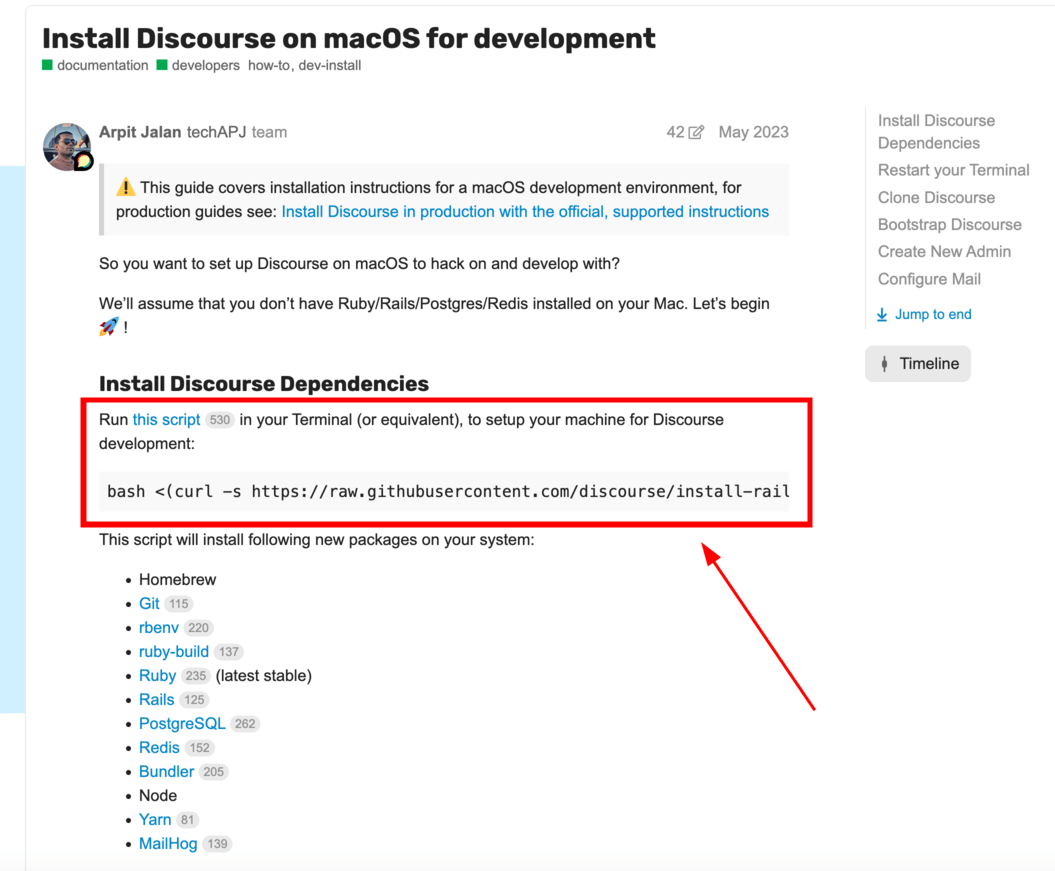
**Update 24/05/2024! Setting up Discourse for Local Development on Mac. (Tested on M1 chip - macOS Sonoma 14.4.1)**
Follow this guide: [Install Discourse on macOS for development - Developer Guides - Discourse Meta](https://meta.discourse.org/t/install-discourse-on-macos-for-development/15772)
When you visit the above URL, please whatever you do, don’t run the bash script. Manually install the packages yourself, one after the other.
Feel free to contact me if you get stuck. I will be happy to help.
---
### Author:  [@AndyatFocallocal](https://publichappinessmovement.com/u/AndyatFocallocal)
#### Post date: [11 January 2023 19:03 UTC](https://publichappinessmovement.com/t/topic/2630/2 "2023-01-11T19:03:50Z")
You’ll also need to install the Docuss plug-in to connect Discourse to our React/Meteor app
> [@Components - Docuss](https://publichappinessmovement.com/t/topic/1144):
>
> Our community building and discussion forum uses a pretty slick integration with [Discourse](https://meta.discourse.com) the worlds largest opensource forum software. This sync enables us to use Discourse to handling the community building, communications, admin functions, and backend of the most of the platform. Settings in our Github [https://github.com/focallocal/fl-maps/blob/master/public/dcs-website.json](https://github.com/focallocal/fl-maps/blob/master/public/dcs-website.json)Docuss Project Github [Home](https://github.com/sylque/docuss)[Client and Libraries](https://github.com/sylque/dcs-client)[schema](https://github.com/sylque/dcs-website-schema)[Discourse Plugin](https://github.com/sylque/dcs-discourse-plugin2)Plugin In our Discourse settings you’ll…
If you need any other plugins, or want to install them all right away so your platform operates exactly as the live one here’s a full list of plugins. Only Docuss operates directly on the ReactJS/MeteorJS. Others may interact with the i-frame window it loads in (toolbars and floating footers).
---
### Author:  [@Alfonsoanaya](https://publichappinessmovement.com/u/Alfonsoanaya)
#### Post date: [20 January 2023 17:42 UTC](https://publichappinessmovement.com/t/topic/2630/3 "2023-01-20T17:42:29Z")
You can also find detailed instructions for setting up discourse on MacOS:
> **[Install Discourse on macOS for development](https://meta.discourse.org/t/install-discourse-on-macos-for-development/15772)**
>
> ⚠ This guide covers installation instructions for a macOS development environment, for production guides see: Install Discourse in production with the official supported instructions So you want to set up Discourse on macOS to hack on and...
and on Windows:
> **[Install Discourse on Windows for development](https://meta.discourse.org/t/install-discourse-on-windows-for-development/75149)**
>
> ℹ This tutorial has been tested on Windows 10 and 11. To set up a development environment for Discourse on Windows, you can do it using Windows Subsystem for Linux feature. This setup requires the WSL 2 installation. It is only available in...
A heads up for Mac users: one of the biggest hurdles you might encounter is that MacOS makes it difficult to update ruby (and you’ll need \<= 2.7 to run discourse). Here’s a very useful and instructive guide on how to update ruby on MacOS:
> **[Install Ruby on Your Mac: Everything You Need to Get Going - Stackify](https://stackify.com/install-ruby-on-your-mac-everything-you-need-to-get-going/)**
>
> Learn how to effortlessly install Ruby on your Mac with detailed, step-by-step instructions to write your first Ruby program.
also check Ruby’s guides to installing ruby:
> **[Installing Ruby](https://www.ruby-lang.org/en/documentation/installation/#rvm)**
---
### Author:  [@AndyatFocallocal](https://publichappinessmovement.com/u/AndyatFocallocal)
#### Post date: [21 January 2023 13:57 UTC](https://publichappinessmovement.com/t/topic/2630/4 "2023-01-21T13:57:20Z")
Those resources are a fantastic help to others in the future, thank you!